In-cell vs G+G vs G+P Tablet Touch Structures Explained
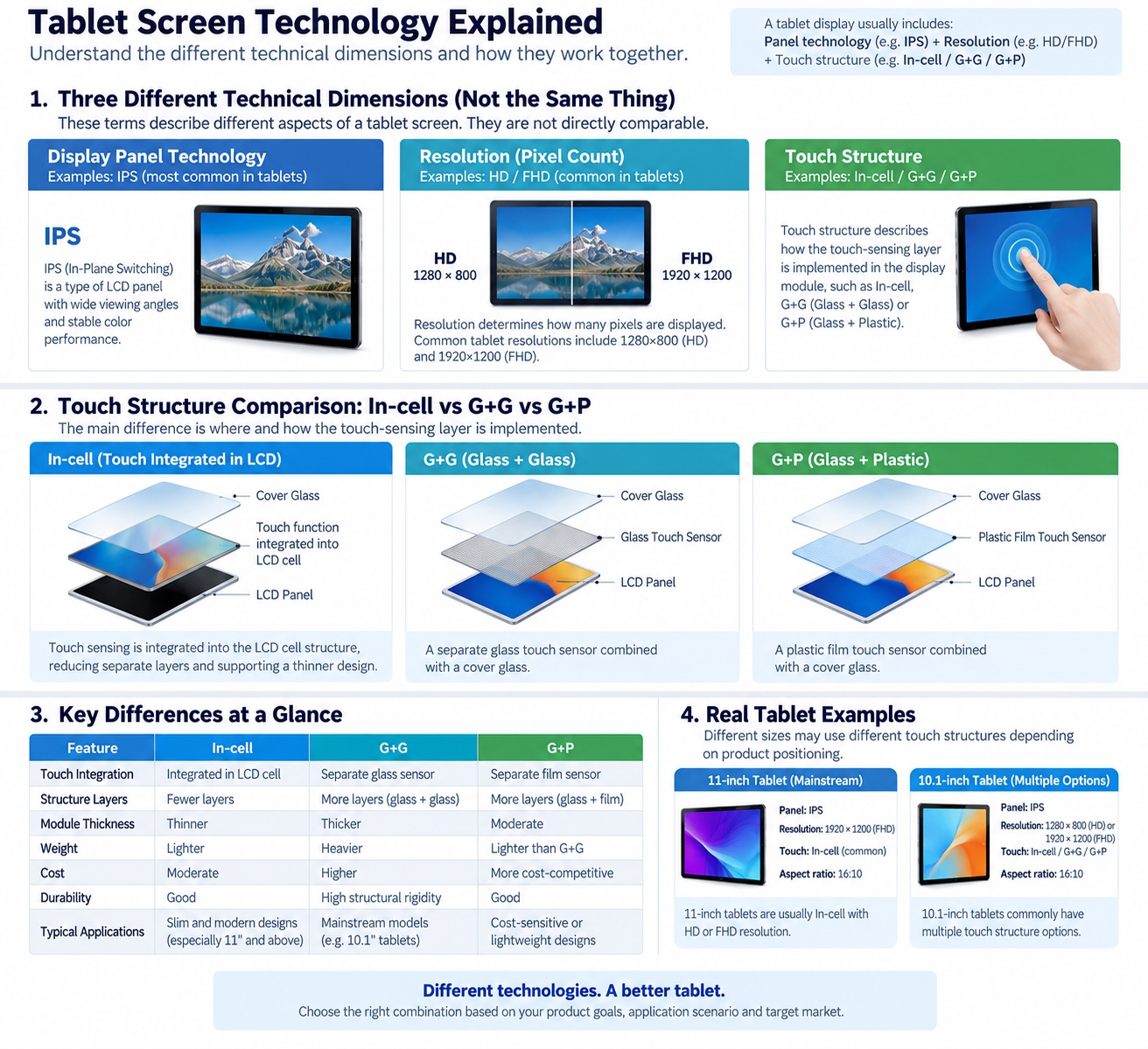
For tablet buyers, display specifications often mix several different technical dimensions in the same line, which can create confusion.
A typical tablet screen description may include terms such as:
- IPS
- FHD
- In-cell
- G+G
- G+P
These terms do not describe the same thing.
A simple way to understand them is:
IPS = display panel technology
HD/FHD / 2K/ UHD = resolution
In-cell / G+G / G+P = touch structure
This means one tablet can use an:
11-inch IPS + In-cell + FHD display
while another can use:
10.1-inch IPS + G+G + HD
Both may use IPS display panels and the same resolution, while using different touch structures.
For OEM and ODM tablet projects, this distinction matters because touch structure can affect product thickness, mechanical design, touch performance, cost and the overall display module architecture.
What is an In-cell touch structure?
In-cell refers to a touch design in which the touch-sensing function is integrated more closely into the LCD cell structure.
Compared with traditional external touch-layer designs, In-cell solutions can reduce the number of separate structural layers in the display module.
For tablet product development, this can support a thinner display stack and a more integrated screen design.
However, buyers should not evaluate In-cell only by asking whether it is “better.”
The real question is whether the selected touch structure fits the project's:
- Product thickness target
- Display size
- Cost target
- Mechanical design
- Touch requirements
- Supply stability
- Repair strategy
- Intended application
What is G+G touch structure?
G+G stands for:
Glass + Glass
In a typical G+G capacitive touch structure, the touch sensor is built on a glass substrate and combined with a separate cover glass.
The structure can be simplified as:
Cover Glass
+
Glass Touch Sensor
+
Display Module
G+G has been widely used in touch devices because glass substrates can provide good structural stability and support durable touch-panel designs.
For OEM buyers, G+G may be considered when the project values:
- Mature touch-panel architecture
- Structural rigidity
- Stable touch performance
- Conventional supply-chain availability
- Separate touch-module design
However, the total module thickness and weight should be evaluated together with the final mechanical design.
What is G+P touch structure?
G+P stands for:
Glass + Plastic
In a typical G+P structure, the cover layer is glass while the touch sensor layer uses a plastic film substrate.
A simplified structure is:
Cover Glass
+
Plastic Film Touch Sensor
+
Display Module
Compared with G+G, G+P can reduce the use of glass layers in the touch module.
Depending on the design, this can influence:
- Weight
- Thickness
- Cost
- Mechanical flexibility
- Touch-module construction
However, G+P should not automatically be described as “lower quality.”
The suitability depends on the product positioning and design target.
For example, a cost-sensitive consumer tablet and a premium metal-body enterprise tablet may prioritize different touch-panel structures.
In-cell vs G+G vs G+P: what is the main difference?
The biggest difference is where and how the touch-sensing layer is implemented.
| Touch Structure | Basic Concept | Typical Design Characteristic |
|---|---|---|
| In-cell | Touch integrated into LCD cell structure | More integrated display/touch module |
| G+G | Glass cover + glass sensor | Separate glass-based touch module |
| G+P | Glass cover + plastic-film sensor | Separate film-based touch module |
For B2B tablet sourcing, this means the decision should not be reduced to:
Which one is best?
A better question is:
Which touch structure is best suited to the product target?
How is touch structure different from IPS?
IPS belongs to a different technical dimension.
IPS, or In-Plane Switching, is an LCD panel technology.
It is commonly associated with characteristics such as:
- Wide viewing angles
- Stable color performance
- Good display consistency
Touch structures such as In-cell, G+G and G+P describe how touch sensing is implemented.
Therefore, a tablet can use:
IPS + In-cell
or:
IPS + G+G
or:
IPS + G+P
depending on the product design.
This distinction is important because many product specifications incorrectly place these terms side by side as if they were competing technologies.
How is touch structure different from FHD or UHD?
FHD and UHD describe resolution, not touch technology.
Typical definitions include:
- FHD: commonly 1920×1080
- HD: commonly 800×1280
Tablet products can also use other resolutions such as:
- 1280×800
- 1920×1200
- 2000×1200
- 2560×1600
Resolution determines how many pixels the display contains.
Touch structure determines how touch sensing is implemented.
These two specifications should therefore be evaluated independently.
For example:
10.95-inch IPS + In-cell + 1920×1200
describes three separate dimensions:
- IPS = panel technology
- In-cell = touch structure
- 1920×1200 = resolution
Why does In-cell matter for tablet design?
In-cell is often attractive in tablet development because a more integrated touch/display structure can support a thinner display stack.
This can be relevant for products targeting:
- Slim industrial design
- Narrow bezels
- Higher screen-to-body ratio
- Lightweight form factors
- Modern consumer appearance
However, product design should still consider:
- Panel availability
- Repairability
- Touch-controller compatibility
- Yield
- Cost
- Mechanical protection
- Long-term supply
A thinner structure is not automatically the best choice if it creates supply-chain or cost problems for the intended product.
Why do some tablet manufacturers still use G+G?
G+G remains relevant because it is a mature touch-panel structure and can provide a robust separated touch solution.
For certain projects, buyers may prefer:
- More conventional touch-module sourcing
- Separate cover glass and touch sensor
- Easier component-level differentiation
- Stable structural design
This can be particularly relevant in products where thickness is not the highest priority.
The correct choice depends on how the entire tablet is designed.
When can G+P be a practical choice?
G+P can be useful when the project seeks a balance between:
- Cost
- Weight
- Thickness
- Touch performance
- Product positioning
Because the touch sensor uses a film substrate rather than a second glass substrate, the module structure differs from G+G.
This can make G+P relevant for cost-sensitive or lightweight products.
However, buyers should evaluate the actual panel and module specification rather than relying only on the touch-structure label.
What should B2B buyers compare besides touch structure?
A touch structure decision should be made together with the full display specification.
For an OEM/ODM tablet project, buyers should compare:
1. Screen size
8.7-inch, 10.1-inch, 10.95-inch, 12.2-inch and larger displays can require different mechanical and UI considerations.
2. Resolution
Resolution affects image detail and interface density.
3. Panel technology
IPS and other LCD technologies affect display characteristics.
4. Touch structure
In-cell, G+G or G+P should match the product design target.
5. Cover glass
Thickness, hardness and surface treatment may affect durability and user experience.
6. Brightness
Indoor and outdoor applications can require different brightness targets.
7. Aspect ratio
16:10, 3:2, 4:3 and 7:5 can create very different usable screen layouts.
8. Mechanical design
Housing thickness, bezel width and internal stack-up should be considered together with the display module.
How should OEM buyers choose between In-cell, G+G and G+P?
A practical decision process can follow this order:
Step 1: Define the application
Is the tablet intended for:
- Consumer use
- Education
- Retail
- Enterprise
- Industrial use
- POS
- Dedicated hardware
Step 2: Define the industrial-design target
Is the priority:
- Thinness
- Durability
- Cost
- Weight
- Repairability
- Premium appearance
Step 3: Define the screen specification
Choose:
- Size
- Resolution
- Aspect ratio
- Panel technology
Step 4: Evaluate touch architecture
Compare whether In-cell, G+G or G+P better fits the design.
Step 5: Validate the complete module
Do not evaluate the touch sensor in isolation.
The display, touch controller, cover glass, housing and mainboard need to work together.
Which touch structures does HommPro use?
HommPro product materials include multiple tablet platforms using In-cell display/touch designs.
Examples include:
| Model | Screen Size | Resolution | Touch / Display Structure |
|---|---|---|---|
| PM876 | 8.7 inch | 800×1340 | In-cell |
| PM108 | 10.1 inch | HD / FHD | In-cell |
| PM116 | 10.95 inch | 1920×1200 | In-cell |
| PM117 | 10.95 inch | 1280×800 / 1920×1200 | In-cell |
These examples show that HommPro uses In-cell solutions across different tablet size categories.
For projects requiring G+G or G+P, availability should be confirmed against the specific product platform.
Do not assume that every HommPro tablet supports all three touch structures.
Does a higher screen-to-body ratio require In-cell?
Not necessarily.
Screen-to-body ratio is influenced by multiple factors, including:
- Bezel design
- Mechanical structure
- Panel dimensions
- Housing design
- Touch/display module construction
In-cell can support a more integrated display design, but high screen-to-body ratio is not determined by touch structure alone.
This is another example of why multiple technical dimensions should not be mixed together.
Which touch structure is better for education tablets?
There is no universal answer.
Education tablets may prioritize:
- Cost
- Drop protection
- Replaceability
- Screen durability
- Touch responsiveness
- Weight
- Battery life
- Long-term supply
A premium thin education tablet and a rugged classroom tablet could reasonably use different touch structures.
The correct choice depends on the overall product requirement.
Which touch structure is better for enterprise tablets?
Enterprise projects may prioritize:
- Device thickness
- Display quality
- Long-term platform stability
- Repair strategy
- Touch reliability
- Software management
- Product lifecycle
In-cell may be attractive for a thinner, more integrated design, while G+G or G+P may be suitable for other mechanical and commercial requirements.
For enterprise deployments, the touch architecture should be evaluated together with the full hardware platform and device lifecycle.
FAQ
Is In-cell a display technology?
Not exactly. In-cell primarily describes how touch sensing is integrated into the display structure.
Is IPS the same as In-cell?
No. IPS is an LCD panel technology, while In-cell is a touch/display integration structure.
Is G+G better than In-cell?
Not universally. G+G and In-cell use different touch architectures and each may suit different product requirements.
Is G+P cheaper than G+G?
G+P can be selected for cost or weight reasons in some designs, but actual pricing depends on panel size, supplier, structure, volume and other specifications, same size & spec G+P cheaper.
Can one tablet use IPS and In-cell at the same time?
Yes. A tablet can use an IPS LCD panel with an In-cell touch structure.
Can one tablet use IPS and G+G?
Yes. IPS describes the LCD panel, while G+G describes the touch structure, so both can appear in the same product.
Does HommPro offer In-cell tablets?
Yes. HommPro product materials include several In-cell tablet platforms across 8.7-inch, 10.1-inch and 10.95-inch sizes.
Does HommPro offer G+G or G+P tablets?
Yes, Value series are G+G & G+P
Conclusion
In-cell, G+G and G+P should be compared as touch structures, while IPS should be treated as a display panel technology and FHD/HD as resolution categories.
For OEM and ODM tablet projects, buyers should evaluate these dimensions separately and then combine them into one complete screen specification.
A good tablet specification should answer:
- What panel technology is used?
- What resolution is required?
- What screen size and aspect ratio fit the application?
- How does the display module fit the mechanical design?
HommPro currently offers multiple G+G/G+P/ In-cell tablet platforms across different screen sizes and resolutions, giving buyers several starting points for customized tablet projects.
Planning a tablet project? Send HommPro your target screen size, resolution, touch structure, application and market requirements to discuss a suitable platform.
OEM vs ODM Android Tablets: A B2B Buyer's Guide
Which Android Tablet Screen Size Is Best for Your Project?
Related Article